※ Editorial Note: The following work scenarios and characters are fictional, designed to help explain the terms. They do not represent the author's actual experiences or real events at any specific company.
Let's assume a situation where, after replacing a long-used laptop, a test for the same project fails only on the new device.
You open the same project on a new computer, but a test that was definitely working until yesterday keeps failing.
When a test that worked until yesterday fails only on the new computer: Drift
text
1Expected node v20.11.0, found v20.9.0
2Config mismatch: 3 settings differ from team baseline
Seeing the same failure repeat, you look up the team's configuration documentation. The baseline version set by the team and the version installed on the new laptop are subtly out of sync.
This is the phenomenon where, even if everyone starts from the same baseline, each person's environment drifts in a slightly different direction over time. It is similar to how multiple clocks set to the exact same time gradually fall out of sync. Only after aligning it back to the team's configuration document did the test pass.
Starting from the same baseline but drifting apart over time
After aligning the versions, you notice that a screenshot containing the company logo looks a bit off.
When there is a faint pattern in the corner of an AI-generated image: Why a watermark is left behind
After seeing an image a designer colleague posted on Slack, you ask about it, and they tell you that the faint pattern in the corner is meant to be there.
It was a marker embedded in the image, barely visible to the human eye, to identify later on that it was generated by AI. It is the same concept as the watermarks on banknotes that are only visible when held up to the light.
A subtle marker of origin embedded in an image
Aside from the image issue, a command you frequently use throws a "not found" error only on the new laptop.
When a command that worked yesterday doesn't work on the new computer: Environment Variables and PATH
bash
1$ mytool --version
2zsh: command not found: mytool
While opening the shell configuration file, you find the reason. On the old laptop, the folder path containing this tool was registered, but it has not been registered on the new laptop yet.
A structure where PATH is just one of many configuration values stored in a drawer
When executing a command, the computer only searches through folders registered in the list called PATH. This means that even if you know the exact name of a tool, you cannot find it if it is in an unregistered folder. Environment variables are like a shared drawer containing these configuration values, and PATH is just one of the lists inside that drawer.
A structure that only scans folders registered in PATH when executing a command
After registering the path, the command ran fine again, but finally, the terminal screen itself looked different from before, making it feel awkward.
Why the prefix in the terminal looks different on each computer: Shell Prompt
text
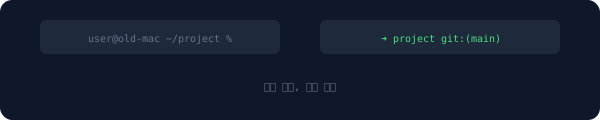
1예전 노트북: user@old-mac ~/project %
2새 노트북: ➜ project git:(main)
Looking at a colleague's screen, you ask why it looks so different. They explain that this is just something you can customize to your liking.
This line that appears right before you type a command in the terminal is called a prompt, and how much necessary information—like the current folder or branch name—it displays is entirely up to each person's settings. It is similar to how different people have different lock screen wallpapers even if they use the same app. Only after a few days of moving in did the new laptop start feeling familiar.
Prompts performing the same role but displaying different information and layouts depending on settings
The working environment, which took two days to migrate, has managed to return to its former state. Most of the things that didn't work on the new computer were issues with configurations written outside the code, not the code itself. To prepare for the next migration, this time, I saved those configurations as files.
Frequently Asked Questions
How can we prevent drift in advance?
By committing team configuration files to the repository and setting up the new environment to automatically install based on those files, you can reduce manual setup mistakes.
Are watermarks in AI-generated images always visible?
No. Some methods hide information invisibly within pixel values, so they often only reveal themselves when checked with a dedicated tool.
Can I add any folder to PATH?
Technically yes, but adding folders from unverified sources poses a security risk. It is safer to only add folders where trusted tools are installed.
This is Part 6 of the <a href="/glossary/code-generation" class="glossary-link" title="A technology in which AI automatically writes programming code based on natural language descriptions or the context of existing code.">AI Coding</a> Tools Glossary series. Coming Up Next · Part 7: What was already happening before the alarm rang during a night shift on incident duty — Heartbeat · Breadcrumbs · Shadow Mode · Pipe · Redirection