※ Editorial Note: The following work situation and characters are part of a hypothetical scenario designed to help explain the terms. They do not depict the author's real-life experiences or actual events at any specific company.
Let's assume a situation where a new developer is tasked with their first deployment of a minor change without a senior developer present.
When they asked the agent to run the deployment script, it suddenly stopped mid-execution, and an unfamiliar message appeared on the screen.
When the Deployment Script Halts on Its Own: What is a Kill Switch?
text
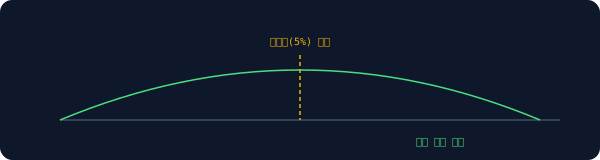
1[ABORTED] error rate 12% exceeded threshold (5%)
2Kill switch triggered. Deployment halted.
The developer in our scenario was flustered because a message popped up saying it stopped on its own, even though they hadn't issued a stop command. But reading the message on the screen closely revealed that the answer was already there.
It was a mechanism that automatically measures the error rate immediately after deployment, and if it exceeds a set threshold, forcibly halts the deployment before a human can even notice. Rather than a literal "killing switch" as the name suggests, it is closer to an emergency stop button pressed in advance to prevent a larger disaster.
A structure where deployment automatically stops the moment the error rate exceeds the threshold
After fixing the script and trying to redeploy, it failed a few times before finally succeeding. The strange thing was that the waiting time was different after each failure.
When the Wait Time Increases with Each Retry: What Backoff Does
Only later did they open the configuration file left behind by their senior colleague and discover the reason.
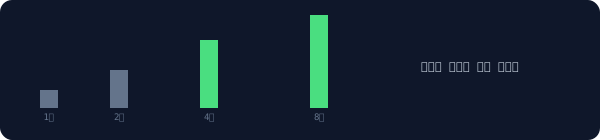
It was pre-configured to increase the retry interval: 2 seconds after the first failure, then 4 seconds, then 8 seconds, and so on. Instead of immediately hammering a failing server, this approach increases the gap to buy time for the server to recover. It is like knocking on a door with increasingly longer pauses rather than pounding on it continuously.
A structure where the wait time until the next retry grows longer after each failure
The deployment went through, but they kept getting confused by a specific file path written inside the script. Only after repeating the same mistake several times did they realize what the problem was.
When the Same Name Keeps Getting Misunderstood: Why the Repository Was Confusing
Seeing the senior's note that said, "Upload it to the repo," they initially thought it referred to a specific folder on the server and kept putting the file in the wrong path. After repeating this mistake about three times, they realized they had misunderstood something.
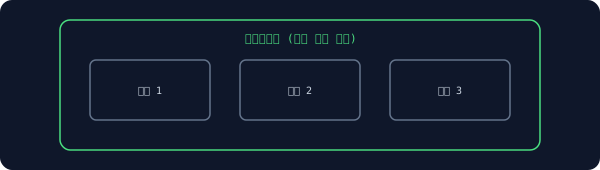
A repository refers to the store itself where the entire history of code changes is recorded, rather than a specific folder. It is like an entire archive where all revised editions of a book are stored in order, rather than just a single library shelf. Since the English word was transliterated as-is, there was no clue for a first-timer as to whether it was a folder or a server.
A unit that contains the entire history of changes up to now, not just a single folder
After resolving the path issue, they noticed this time that it took an unusually long time to see the results after modifying the code.
When Saving Code but It Takes Ages to Reflect: Why Compiling is Necessary
Curious about why it took so long, they searched online. It turned out there was an intermediate process that converts the human-written code into a format the computer can process faster, rather than running the code directly.
This conversion process is called compiling, or building. It is similar to how a written manuscript does not instantly become a book, but must go through editing and printing before hitting bookstore shelves. As the number of files increased, this process grew longer.
An intermediate conversion stage where human-written code is transformed into an executable format
Although the conversion was finished, an error that only appeared when actually running the service kept showing up in the logs.
When the Code Passes Inspection but Errors Occur Upon Running: Runtime
text
1TypeError: cannot read property 'price' of undefined
2 at runtime (checkout.js:42)
Reading the log again, the phrase at runtime caught their eye. They realized that during the compilation stage, only the code syntax is checked; it cannot catch errors that occur only at the exact moment a user clicks that banner, or when the data actually flows in.
Just as checking a recipe for typos is different from finding out the pot is too small when you actually cook, code similarly reveals different issues when written versus when it is actually running.
A structure where different problems are revealed at the time of writing code versus the time of actual execution
Ultimately, the banner copy went up successfully. When the senior colleague returns and asks, the developer plans to talk first about where and why things stopped, rather than just saying the deployment succeeded. What remained from their first solo deployment was not the success, but those points where it stopped.
Frequently Asked Questions
Who determines the kill switch threshold?
Usually, the team sets it in advance based on the nature of the service. If the threshold is too low, deployments will frequently stop even for minor variations; if it is too high, major incidents might be missed. Thus, it is often adjusted based on actual traffic patterns.
Does the backoff interval increase indefinitely?
Usually, a maximum wait time is set, and it is not increased beyond that. Otherwise, it would have the adverse effect of delaying the retry too much even after the server has recovered.
Can runtime errors not be caught at all during the compilation stage?
Some can be caught in advance using type-checking tools, but issues related to values determined only at runtime—such as actual user input or external server responses—often only reveal themselves when actually running the code.
This is Part 4 of the <a href="/glossary/code-generation" class="glossary-link" title="A technology in which AI automatically writes programming code based on natural language descriptions or the context of existing code.">AI Coding</a> Tool Glossary series. Next Episode Preview · Part 5: Terms Encountered by a Startup Founder Quietly Releasing a New Feature at Dawn (Canary Rollout · <a href="/glossary/cold-start" class="glossary-link" title="The response latency that occurs when an AI system is launched from an inactive state, or the phenomenon in recommendation systems where accurate results cannot be provided to new users due to a lack of data.">Cold Start</a> · <a href="/glossary/hallucination" class="glossary-link" title="A phenomenon in which an AI model, in the process of predicting the next word based on statistical probability, logically and confidently generates incorrect or groundless information as if it were the truth.">Hallucination</a> · Package Manager · Lockfile)